
🔥 Hot
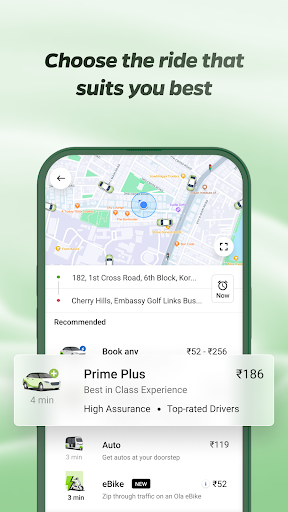

Ola: Book Cab, Auto, Bike Taxi
Upgrade your life the OLA Way!
Ever found yourself chasing Cabs, Auto Rickshaws or Bike Taxis? Craving your favorite food, or searching for a reliable parcel service? Welcome to your one-stop destination - the Ola App! With over 40 Million Trusted users across 200+ cities in India, OLA has become the Choice of the Nation.
🚗 Want to learn about our Services in OLA App?
Let’s start with the A, B & C of Rides:
🛺 A for Auto Rickshaw: Want Auto rides without the Fare drama ?
No more “meter nahi chal raha” excuses. Hop in for quick and affordable city trips with Transparent fares where your pocket will thank you.
Tuk Tuk Tuk Tuk 🛺 …… your OLA Auto is waiting for you.
🛵 B for Bike Taxi: Need to be as quick as a bullet?
Say hello to your little friend, Ola Bike Taxi! Slip through traffic jams like a pro ninja. Perfect for solo riders with places to be.
Why wait? Zip, zap, zoom!
🚗 C for Cab: Because You Deserve Options
Whatever your need, we’ve got an OLA cab for that:
🚗 OLA Mini: Quick, comfy & wallet-friendly.
🚘 OLA Prime Sedan: Spacious sedans, perfect for longer rides where you can Netflix & Ride in comfort.
🚙 OLA Prime Plus: A touch of luxury & Guaranteed no cancellations. Just you and your premium quality ride with Top notch drivers.
🚐 OLA Prime SUV: Traveling squad-style for a trip? Get Spacious SUVs with ample room for your Family or Friends and their luggage.
OLA Rental Cars:
Need a flexible ride for a few hours? 🕒 Renting a car with Ola gives you the freedom to hire a car on your terms. Whether it’s for running errands, meeting friends or family, or cruising the city, you can make as many stops as you want 🚗.
OLA Outstation Cabs:
Planning a long intercity ride? Pack your bags for a dream vacation or a hometown visit! 🌆 Sit back, vibe to your playlist 🎶 and let us handle the wheel 🛣️🚖.
But why Ride Ola?
🔒 Verified OTP:Travel OLA-round only after confirming with a secure OTP.
🧳 Luggage-Friendly: Plenty of space for all your essentials.
🕒 Schedule Rides: Plan your travel with ease & never miss your ride.
📞 SOS Feature: Prioritizing your safety every step of the way.
🚨 Emergency Contacts: Keep your loved ones in the loop.
Oh wait! It does not end here. We are more than just rides now.
🍔 Food Delivery:
Knock Knock, your meal is here! Ola Foods now delivers love on plate.
🍉 Choose from endless Desi & International cuisines to mouthwatering snacks or desserts. After all, a happy tummy = happy ❤️!
😋 Over 9000+ restaurants with a range of top choices & Nearby spots, including Domino’s, Pizza Hut, McDonald’s, Starbucks, Subway, Burger King, KFC & more.
💸 Order meals at pocket-friendly prices! With discounts up to 50%, make your expenses lighter & your tummy heavier.
🥗 Switch to our New Veg mod for Vegetarian lovers.
So what are you waiting for? Your Food’s just a tap away.
📦 Parcel Delivery:
Got something to send? Or waiting for that "urgent" delivery?🏃♀️ Zip packages across the city via OLA Parcel.
Send Packages: 📤Pack it & Send it. Enter the pickup & drop-off locations, we’ll handle the rest! 🚚
Receive Packages: 📥 Track it & Receive it. Keep an eye on the live tracking & get your package delivered right to you! 📦✨
Booking a Cab, Ordering Food, or Sending & Receiving a Parcel? OLA super easy all-in-one app will guide you every step of the way.
✅ Pick Your Location Easily. Yes, even that chai stall near the signal! 📍
✅ Pay Your Way – Cash, UPI, Cards and more!
✅ Track your ride in Real-Time 🚀
Special Offer
It’s raining GOLD here! 🌟 Earn & redeem OLA Coins for epic discounts on every rides, meals & courier services and save more 💰.
Just open the app and see how effortless it is! 😉 Download, tap and get the OLA-timate Experience! ✨


YouVersion Bible App + Audio
On more than 500 million devices around the world 🌏, people are reading, listening to, watching, and sharing the Bible daily using the YouVersion Bible App—completely free. 2,500+ Bible versions, 2,100+ languages. Listen to audio Bibles. Thousands of Reading Plans & Devotionals in 99+ languages. Download the Bible App
Customize your Bible 📙with Highlights, Bookmarks, and public/private Notes. Access everything online, or download select versions to read offline. Read, study, and share with friends. Enjoy honest conversations about faith in trusted community. Grow together 🙏 every day with friends, sharing your discoveries. Create shareable Bible art: add Bible verses to your photos.
📕READ THE BIBLE DAILY📕
● Experience the Bible App in any of 65+ languages
● Switch between 2,500+ Bible versions, 2,100+ languages
● Popular versions: King James Version KJV, New International Version NIV, New Living Translation NLT, English Standard Version ESV, NASB, New Revised Standard Version NRSV
● Offline Bibles: Read offline even w/o network access (select versions)
● Audio Bibles: Audio for select versions (not available offline)
● Verse of the Day widget
🧑🤝🧑BIBLE STUDY WITH FRIENDS🧑🤝🧑
● Center your friendships around Scripture by adding your Friends to the Bible App
● See an activity feed that shows what you and your Friends are noting, bookmarking, and highlighting
● Comment on the Verse of the Day with your Friends—ask questions and share how God is speaking to you
● Write your own prayers and share them with your Friends to pray together
● Do Plans together and discuss what you’re learning
📖STUDY GOD'S WORD📖
● Reading Plans: Thousands of Devotionals, Bible Plans. Bible study topics or read portions of the Bible. Read the entire Bible (both One Year® Bible and Bible in One Year)
● Video: Watch clips from the JESUS film, Bible Project, Lumo Project, The Chosen, Spoken Gospel, Streetlights, & more.
📝CUSTOMIZE YOUR FREE BIBLE📝
● Verse Images: Create amazing bible verse images
● Highlights: Select custom colors
● Bookmarks: Memorize and finding your favorite Bible verses
● Share verses with friends: social media, email, or SMS/text
● Notes: Keep them private so only you can see them, or public to share with friends
● Cloud Sync: With a free YouVersion account, see your Notes, Highlights, Bookmarks and Reading Plans on any supported device
● Easy Reading: Adjust font, text size, and contrast for bright or low light
🤝CONNECT WITH YOUVERSION🤝
● Contact support from inside the Bible App
● Like us on Facebook
https://facebook.com/youversion
● Follow us on Twitter
https://twitter.com/youversion
● Keep current on our blog
https://blog.youversion.com
● YouVersion online
https://bible.com
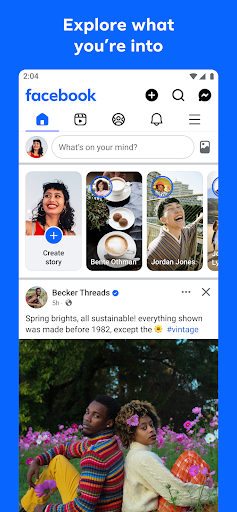

Facebook
Where real people propel your curiosity. Whether you’re thrifting gear, showing reels to that group who gets it, or sharing laughs over fun images reimagined by AI, Facebook helps you make things happen like no other social network.
Explore and expand your interests:
* Shop Marketplace for hidden gems and take your hobbies to the next level
* Personalize your Feed to see more of what you like, less of what you don’t
* Ask Meta AI for information and get answers instantly
* Drive into reels that reflect the things you're interested in
* Search Facebook on any topic and get more interactive results
Connect with people and communities:
* Join groups to learn tips from real people who’ve been there, done that
* Get inspired by creators, or catch up with Friends
* Add new Friends to your world, but also decide how closely to keep up with them
* Privately message relatable posts that only your BFF will get or that reels trend everyone’s talking about
* Catch up with your friends through video and voice calls
Share your world:
* Use generative AI to create custom stickers and images to delight friends
* Customize your profile to choose how you show up and who sees your posts
* Effortlessly create reels from trending templates, or showcase your creativity with a full suite of editing tools
* Capture moments on the fly with stories
Some features may not be available in your country or region.
Terms & Policies: https://www.facebook.com/policies_center
Privacy Policy: https://www.facebook.com/privacy
Learn how we're working to help keep our communities safe across Meta technologies at the Meta Safety Center: https://about.meta.com/actions/safety
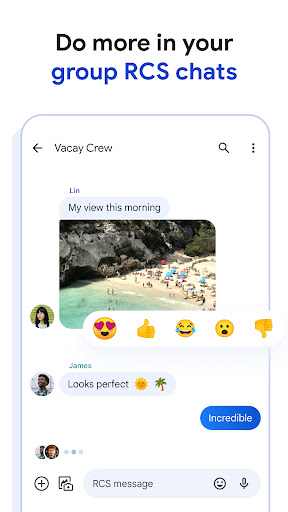

Google Messages
Google Messages is the official Google app for messaging. Google Messages is revolutionizing how a billion users connect and is powered by Rich Communication Services (RCS), the industry standard for texting that replaces SMS and MMS. With RCS, you can share high resolution photos and videos, enjoy dynamic group chats, and seamlessly connect with other RCS users including your iPhone friends.
• Rich Communication: Share high-quality photos and videos, see when friends are typing, and enjoy dynamic group chats that now seamlessly include your iPhone friends.
• Personal Touch: Make conversations uniquely yours with features like custom chat bubble colors or fun selfie gifs.
• Privacy Matters: Rest easy knowing your personal chats are protected with end-to-end encryption between Google Messages users, so no one (including Google and third parties) can read or view your messages and attachments except the person you’re messaging. Plus, enjoy advanced spam protection.
• AI-Powered Messaging: Craft the perfect message with Magic Compose suggestions and our latest AI features.
• Seamless Across Devices: Start a chat on your phone and continue it effortlessly on your tablet or computer. The app is also available on Wear OS.
Google Messages is more than just messaging; it's a richer, safer, and more expressive way to connect.
App is also available on Wear OS. Availability of RCS varies by region and carrier and a data plan may be required. Availability of features varies by market and device and sign up for beta testing may be required.
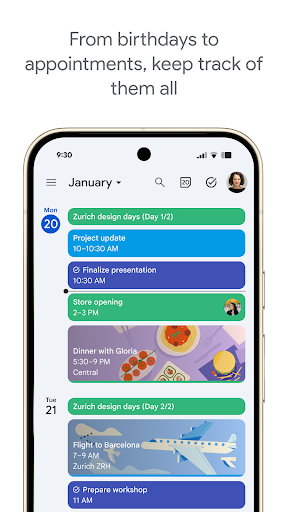

Google Calendar
Get the official Google Calendar app, for your Android phone, tablet, or Wear OS device to stay organized and plan your day. Make the most of your day with easy event creation, multiple calendars, customizable views, widgets, tasks, and more
With Google Calendar, you can:
• Get events automatically added to your Calendar from Gmail, including flight, hotel, concert, and restaurant reservations.
• Go from using Calendar on your Android phone, tablet, or Wear OS device to your computer without missing a beat when you’re logged into the same Google account.
• Consolidate and view Google Calendar events side-by-side with other calendars on your device, including Exchange.
• Keep family, friends, and colleagues in the loop with shared calendars, so they can view, add, or modify events.
• Quickly switch between month, week, and day views.
• Stay on top of to-dos by creating and managing tasks alongside your events in Calendar.
• Personalize your Google Calendar with light or dark mode or by color-coding your events.
• Access and organize your task lists in a full-screen view right from the Google Calendar app.
• Keep track of events or tasks while on the go with Google Calendar on Wear OS devices, which supports tiles and complications.
Google Calendar is part of Google Workspace, allowing you and your team to easily connect, create, and collaborate across all your favorite Google tools. You can:
• Collaborate in a hybrid work environment by adding a Google Meet video call to an Calendar event
• Get access to professional booking pages to easily book clients and customers*.
• Schedule meetings with teammates by checking their availability or layering their calendars in a single view
• Add your working location to your calendar to make it easier for your teammates to schedule meetings with you*.
• Keep everyone on track for a meeting by attaching meeting notes, pre-read materials, and other documents directly to a calendar event.
• Use Google Calendar with confidence knowing it’s supported by Google’s enterprise-level privacy, user safety and data security.
Learn more about Google Workspace: https://workspace.google.com/products/calendar/
Follow us for more:
X: https://x.com/googleworkspace
LinkedIn: https://www.linkedin.com/showcase/googleworkspace
Facebook: https://www.facebook.com/googleworkspace/
✍️ Good reviews


TravelSpend: Travel Budget App
TravelSpend is an app to track your spending while traveling the world. It's perfect for you if you are planning your next trip or are already on vacation. If you travel in a group you can share expenses with friends and family to see “who owes who.”
This app is for travelers like you - no matter if you are a solo traveler on a round-the-world trip, a couple backpacking together or a group of friends on a weekend holiday.
Try it now for free!
(unlimited free expenses)
Track your travel expenses 🌍
We designed TravelSpend specifically for travelers. It's quick and easy to use and works offline. You can add photos and spread expenses over multiple days.
Stick to your budget 💰
The app will help you keep track of your travel budget and to save money.
Don't worry about currencies exchange rates 💱
Add expenses in any currency. They will automatically convert to your home currency.
Share & sync 👫
Invite friends or family and organize your budget together. Your data syncs in real-time cross-platform (iOS, Android).
Split costs 💵
Share your trip with your partner or a group of friends and keep track of who owes whom. Split bills, check your balances and settle debts all within TravelSpend.
Gain insights from your spending 📊
See your spending data visualized. You'll be able to analyze your spending so you can avoid overspending.
Export your data 🗄
To create expense reports you can easily export your spending data to a CSV file anytime.


Coscos
Coscos is a live social community with so many users around the world where you can connect with new friends, and watch talented creators
You can make real friends, chat with your favorite creators using our real-time chat, and join the new wave of social communication.


QuickBars for Home Assistant
Bring your smart home to the big screen. QuickBars for Home Assistant puts fast, beautiful controls on Android/Google TV so you can toggle lights, adjust climate, run scripts, and more—without leaving what you’re watching.
What it does
• Instant overlays (QuickBars): Launch an interactive sidebar over any app for tap-fast control of your favorite Home Assistant entities.
• Remote key actions: Map single, double, and long-press on your TV remote to open a QuickBar, toggle an entity, or launch another app.
• Camera PIP: Import your MJPEG streams and display them as PIP.
• Deep customization: Choose entities, icons, names, order, colors, and more to tailor the experience.
• TV-first UX: Built for Android/Google TV with smooth animations and a clean, couch-friendly layout.
• Launch a QuickBar or PIP from Home Assistant: Requires persistent background connection enabled, allows you to launch a camera PIP or a QuickBar based on an Home Assistant automation!
• Backup & Restore: Backup your Entities, QuickBars and Trigger keys manually and restore them, even to a different TV!
Private & secure
• Local connection: Connect directly to your Home Assistant using IP + a Long-Lived Access Token (optional remote access via HTTPS).
• Hardware-backed encryption: Your credentials are encrypted and stored locally; they never leave the device except to communicate with Home Assistant.
• Clear permission prompts for Accessibility (to capture remote button presses) and Display over other apps (to show overlays).
Easy setup
• Guided onboarding: Where to find your Home Assistant URL and how to create a token.
• QR Token Transfer: Scan a QR code and paste your token from your phone—no tedious typing on TV.
Entity management
• Import the entities you care about, rename them with friendly names, choose icons, customize single/long-press actions, and reorder freely.
• Automatically flags orphaned entities that were removed from Home Assistant.
Free vs Plus
• Free: 1 QuickBar & 1 Trigger Key. Full styling options. Full single/double/long-press support.
• Plus (one-time purchase): Unlimited QuickBars & Trigger Keys, plus advanced layouts:
• Position QuickBars at Top / Bottom / Left / Right of the screen
• For left/right positions, choose 1-column or 2-column grid
Requirements
• A running Home Assistant instance (local or reachable via HTTPS).
• Android/Google TV device.
• Permissions: Accessibility (for remote key capture) and Display over other apps.
Take control of your home from the couch. Download QuickBars for Home Assistant and make your TV the smartest remote you own.
QuickBars for Home Assistant is an independent project and is not affiliated with Home Assistant or the Open Home Foundation.
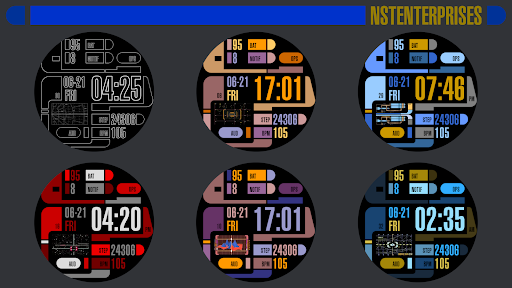
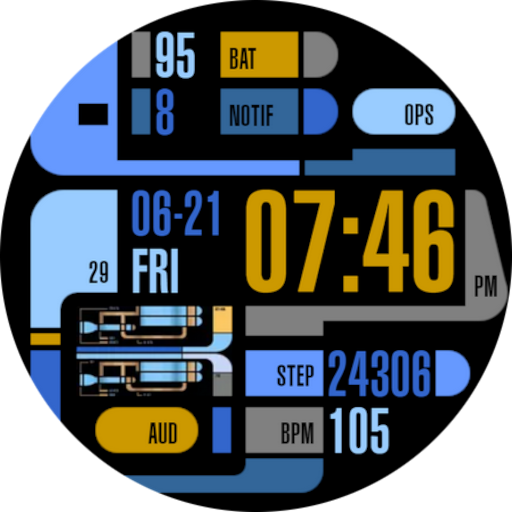
TREK: 24th Century Watch v2
Animated Watch Face with Customizable Regular + Always On Displays in 24th Century style. This is for Wear OS and Wear OS based smartwatches.
Mix & Match:
• 5 backgrounds
• 10 animations
• 10 text color themes
After installing, open your Wear app and it will be in your watch face list to be applied. See the Play Store listing's screenshot or video for list of functions/information displayed.
To customize, long press your watch face and choose the customize option. Then swipe up/down/left/right through the customization options. You can also do this easier in your phone's Wear app.
This watch face's interface is meant to parody the way sci-fi designers on a cheap budget imagined future computers over 30 years ago. Made with cones, curves, and various blocks in the basic colors computers were capable of at the time. Topped with tiny text that was meaningless and buttons with completely indecipherable function or layout.
I stayed true to that style, but for my artistic expression, I took something so ridiculous, counter-intuitive, and nonsensical, and transformed it into something smart. I gave it actual meaning and function to make it readable and functional.
This is a generic interface that uses only public domain simple curves, colors, rectangles, etc. and contains no trademarked material from any old - games, computer programs, shows or movies. I respect copyrights, so please don't ask me to update to include them in reviews or by mail.
↑ ★ ★ ★ ★ ★ ↑
Light up the stars :-) It helps me.
Like and follow my Facebook page for the latest releases and updates. https://www.facebook.com/Not.Star.Trek.LCARS.Apps/
Also click on my developer name "NSTEnterprises" at the top to see my other offerings.


Digital Key Connect - Car Key
Tired of fumbling around for your keys? Want to get real-time updates on your car's status? Digital Key Connect - Car Key, the app that turns your smartphone into a smart and powerful car control center.
Experience Convenience and Control of your vehicle:
✅ Wirelessly LOCK & UNLOCK car doors on your phone: a simple tap on your smartphone screen. Whether you're rushing into the house and forgot to lock up, or want to grant a trusted friend temporary access, Digital Key Connect - Car Key provides instant and reliable door control. This is your ultimate digital car key solution.
✅ Real-time Tire Pressure, Access Monitoring on your phone: Digital Key Connect - Car Key app will car key connect seamlessly with your vehicle's sensors to display the current pressure of each tire directly on your smartphone.
✅ Comprehensive Vehicle Status Tracking on your phone, including tire pressure, oil / EV battery level, and receive safety alerts to avoid risks of road accidents or engine breakdown when driving. Stay informed about your car's condition before you even step inside, allowing you to plan your journeys with confidence and anticipate any potential maintenance needs.
✅ SMART MAP to remotely locate your car or find the fastest routes to car parks or gas / EV charging stations on maps.
✅ Integrated CarAI virtual assistant helps solve your problems
Benefits of Using Digital Key Connect - Car Key:
Enhanced Security:
Remotely lock your car doors for added peace of mind, no matter where you are.
IIncreased Convenience:
Unlock car effortlessly, especially useful when your hands are full or in inclement weather.
Proactive Vehicle Maintenance:
Stay informed about your tire pressure and other vital vehicle stats to prevent potential issues and ensure optimal performance.
Improved Fuel Efficiency:
Maintaining correct tire pressure, as monitored by the app, can contribute to better fuel economy.
Extended Tire Lifespan:
Timely alerts about low tire pressure can help you avoid premature tire wear.
Instant Access to Information:
The Car AI Assistant provides quick and easy answers to your car-related questions, eliminating the need for manual searches.
Greater Confidence on the Road:
Knowing your car's status in real-time empowers you to drive with more assurance.
Your Digital Car Key:
Replace your traditional key with the convenience of your smartphone.
Seamless Car Key Connect:
Establish a reliable and secure connection with your vehicle.
Digital Key Connect - Car Key app isn't just another remote control app; it's your personal Car AI Assistant, providing seamless access, vital vehicle information, and unparalleled convenience right at your fingertips. Imagine a world where you can effortlessly manage your car's essential functions and gain deeper insights into its status, all through the intuitive interface of your smartphone. That future is now, with Digital Key Connect - Car Key.
Thanks and Best Regards,
Terms of Use: https://cooldev.vn/p/1/privacy-policy
Privacy Policy: https://cooldev.vn/p/2/terms-of-service
Contact Us: [email protected]
🔥 Hot Comments

Collage Maker | Photo Editor
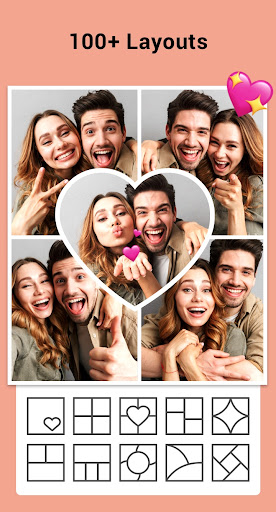
Collage Maker is your go-to photo collage maker and photo frame app in pics art trip.
Just select several photos in your photo lab, Collage Maker instantly remix them into cool photo collage. Pick the layout you like, edit picture and decorate it with filters, stickers, texts and much more.
AI Photo Enhancer launched! Transform your blurry, damaged or old photos into stunning HD quality with just one tap. Say goodbye to low-quality shots and hello to stunning results!
Features:
• Combine up to 100 photos to create pic collage.
• 100+ Layouts of frames or grids to choose from!
• Large number of Background, Sticker, Font, and doodle to choose from!
• Add stylish photo frames for love, celebration, and everyday moments.
• Change ratio of collage and edit border of collage.
• Make photo collage with Free style or Grid style.
• Crop pictures and edit photo with Filter, Text.
• Insta square photo with blur background for Instagram.
• Save photo in high resolution and share pictures to social apps.
📷 Side by Side Photos 📷
Lots of inspirational uses to create side-by-side photos. You can make a before & after SNS cover, create YouTube thumbnails side by side, and even make side-by-side outfit comparison Instagram posts.
🖼 Grid Photo 🖼
Create photo collage with hundreds of layouts in seconds. Custom grid photo size, border and background, you can design layout on your own! So easy to make a beautiful photo collage.
📸 Edit Photo 📸
All-in-one photo editor & photo frame app provides a bunch of editing tools: crop picture, apply filter to picture, add sticker, photo frames, and text to image, draw on image with doodle tool, flip, rotate...
🎨 Freestyle 🎨
Select beautiful background with full screen ratio to create a scrapbook. You can decorate with pictures, stickers, texts, doodles, and share your scrapbook to Instagram Stories and Snapchat Stories.
🌟 Story Template 🌟
100+ Stylized templates including Film, Magazine, Ripped Paper… Have fun with this Insta story maker, share your most memorable moments with friends.
📷 Multi-fit 📷
Insta square photo in a blur background or white to fit for Instagram. You can choose multiple ratios, 1:1, 4:5, 9:16 ratios, etc. Easily post entire photo with no crop. You can even square up to 10 photos at one time.
About our permissions:
Collage Maker asks for permissions "READ_EXTERNAL_STORAGE, WRITE_EXTERNAL_STORAGE" to read your photos/videos so that we can edit and save photos. We do not use this permission for any other purpose.
Collage Maker is your go-to photo collage maker, photo frame app and photo editor for Instagram and printing. Follow @gridart.app and remember to post with hashtag #gridart on Instagram. Win chances to be featured and get a ton of likes! If you have any problems or suggestions, feel free to let us know. Email: [email protected]
Ola: Book Cab, Auto, Bike Taxi
Upgrade your life the OLA Way!
Ever found yourself chasing Cabs, Auto Rickshaws or Bike Taxis? Craving your favorite food, or searching for a reliable parcel service? Welcome to your one-stop destination - the Ola App! With over 40 Million Trusted users across 200+ cities in India, OLA has become the Choice of the Nation.
🚗 Want to learn about our Services in OLA App?
Let’s start with the A, B & C of Rides:
🛺 A for Auto Rickshaw: Want Auto rides without the Fare drama ?
No more “meter nahi chal raha” excuses. Hop in for quick and affordable city trips with Transparent fares where your pocket will thank you.
Tuk Tuk Tuk Tuk 🛺 …… your OLA Auto is waiting for you.
🛵 B for Bike Taxi: Need to be as quick as a bullet?
Say hello to your little friend, Ola Bike Taxi! Slip through traffic jams like a pro ninja. Perfect for solo riders with places to be.
Why wait? Zip, zap, zoom!
🚗 C for Cab: Because You Deserve Options
Whatever your need, we’ve got an OLA cab for that:
🚗 OLA Mini: Quick, comfy & wallet-friendly.
🚘 OLA Prime Sedan: Spacious sedans, perfect for longer rides where you can Netflix & Ride in comfort.
🚙 OLA Prime Plus: A touch of luxury & Guaranteed no cancellations. Just you and your premium quality ride with Top notch drivers.
🚐 OLA Prime SUV: Traveling squad-style for a trip? Get Spacious SUVs with ample room for your Family or Friends and their luggage.
OLA Rental Cars:
Need a flexible ride for a few hours? 🕒 Renting a car with Ola gives you the freedom to hire a car on your terms. Whether it’s for running errands, meeting friends or family, or cruising the city, you can make as many stops as you want 🚗.
OLA Outstation Cabs:
Planning a long intercity ride? Pack your bags for a dream vacation or a hometown visit! 🌆 Sit back, vibe to your playlist 🎶 and let us handle the wheel 🛣️🚖.
But why Ride Ola?
🔒 Verified OTP:Travel OLA-round only after confirming with a secure OTP.
🧳 Luggage-Friendly: Plenty of space for all your essentials.
🕒 Schedule Rides: Plan your travel with ease & never miss your ride.
📞 SOS Feature: Prioritizing your safety every step of the way.
🚨 Emergency Contacts: Keep your loved ones in the loop.
Oh wait! It does not end here. We are more than just rides now.
🍔 Food Delivery:
Knock Knock, your meal is here! Ola Foods now delivers love on plate.
🍉 Choose from endless Desi & International cuisines to mouthwatering snacks or desserts. After all, a happy tummy = happy ❤️!
😋 Over 9000+ restaurants with a range of top choices & Nearby spots, including Domino’s, Pizza Hut, McDonald’s, Starbucks, Subway, Burger King, KFC & more.
💸 Order meals at pocket-friendly prices! With discounts up to 50%, make your expenses lighter & your tummy heavier.
🥗 Switch to our New Veg mod for Vegetarian lovers.
So what are you waiting for? Your Food’s just a tap away.
📦 Parcel Delivery:
Got something to send? Or waiting for that "urgent" delivery?🏃♀️ Zip packages across the city via OLA Parcel.
Send Packages: 📤Pack it & Send it. Enter the pickup & drop-off locations, we’ll handle the rest! 🚚
Receive Packages: 📥 Track it & Receive it. Keep an eye on the live tracking & get your package delivered right to you! 📦✨
Booking a Cab, Ordering Food, or Sending & Receiving a Parcel? OLA super easy all-in-one app will guide you every step of the way.
✅ Pick Your Location Easily. Yes, even that chai stall near the signal! 📍
✅ Pay Your Way – Cash, UPI, Cards and more!
✅ Track your ride in Real-Time 🚀
Special Offer
It’s raining GOLD here! 🌟 Earn & redeem OLA Coins for epic discounts on every rides, meals & courier services and save more 💰.
Just open the app and see how effortless it is! 😉 Download, tap and get the OLA-timate Experience! ✨
YouVersion Bible App + Audio
On more than 500 million devices around the world 🌏, people are reading, listening to, watching, and sharing the Bible daily using the YouVersion Bible App—completely free. 2,500+ Bible versions, 2,100+ languages. Listen to audio Bibles. Thousands of Reading Plans & Devotionals in 99+ languages. Download the Bible App
Customize your Bible 📙with Highlights, Bookmarks, and public/private Notes. Access everything online, or download select versions to read offline. Read, study, and share with friends. Enjoy honest conversations about faith in trusted community. Grow together 🙏 every day with friends, sharing your discoveries. Create shareable Bible art: add Bible verses to your photos.
📕READ THE BIBLE DAILY📕
● Experience the Bible App in any of 65+ languages
● Switch between 2,500+ Bible versions, 2,100+ languages
● Popular versions: King James Version KJV, New International Version NIV, New Living Translation NLT, English Standard Version ESV, NASB, New Revised Standard Version NRSV
● Offline Bibles: Read offline even w/o network access (select versions)
● Audio Bibles: Audio for select versions (not available offline)
● Verse of the Day widget
🧑🤝🧑BIBLE STUDY WITH FRIENDS🧑🤝🧑
● Center your friendships around Scripture by adding your Friends to the Bible App
● See an activity feed that shows what you and your Friends are noting, bookmarking, and highlighting
● Comment on the Verse of the Day with your Friends—ask questions and share how God is speaking to you
● Write your own prayers and share them with your Friends to pray together
● Do Plans together and discuss what you’re learning
📖STUDY GOD'S WORD📖
● Reading Plans: Thousands of Devotionals, Bible Plans. Bible study topics or read portions of the Bible. Read the entire Bible (both One Year® Bible and Bible in One Year)
● Video: Watch clips from the JESUS film, Bible Project, Lumo Project, The Chosen, Spoken Gospel, Streetlights, & more.
📝CUSTOMIZE YOUR FREE BIBLE📝
● Verse Images: Create amazing bible verse images
● Highlights: Select custom colors
● Bookmarks: Memorize and finding your favorite Bible verses
● Share verses with friends: social media, email, or SMS/text
● Notes: Keep them private so only you can see them, or public to share with friends
● Cloud Sync: With a free YouVersion account, see your Notes, Highlights, Bookmarks and Reading Plans on any supported device
● Easy Reading: Adjust font, text size, and contrast for bright or low light
🤝CONNECT WITH YOUVERSION🤝
● Contact support from inside the Bible App
● Like us on Facebook
https://facebook.com/youversion
● Follow us on Twitter
https://twitter.com/youversion
● Keep current on our blog
https://blog.youversion.com
● YouVersion online
https://bible.com

ColorNote Notepad Notes
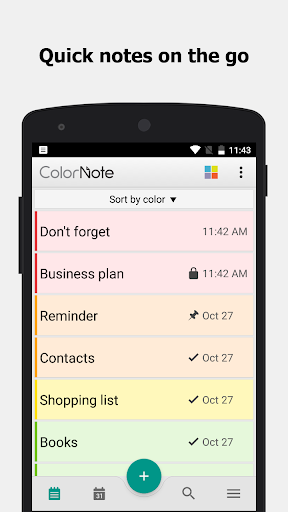
ColorNote® is a simple and awesome notepad app. It gives you a quick and simple notepad editing experience when you write notes, memos, e-mails, messages, shopping lists and to-do lists. Taking notes with ColorNote® Notepad is easier than any other notepad or memo pad app.
* Notice *
- If you cannot find the widget, then please read the FAQ below.
- When you're finished using the notepad, an automatic save command preserves your individual note.
* Product Description *
ColorNote® features two basic note taking formats, a lined-paper styled text option, and a checklist option. Add as many as you want to your master list, which appears on the app's home screen each time the program opens. This list may be viewed in traditional ascending order, in grid format, or by note color.
- Taking a Note -
Serving as a simple word processing program, the text option allows for as many characters as you're willing to type. Once saved, you can edit, share, set a reminder, or check off or delete the note through your device's menu button. When checking off a text note, the app places a slash through the list's title, and this will be displayed on the main menu.
- Making To-do List or Shopping List -
In the checklist mode, you can add as many items as you'd like and arrange their order with drag buttons activated in the edit mode. After the list is finished and saved, you may check or uncheck each line on your list with a quick tap, which will toggle a line slash. If all items have been checked, then the list's title is slashed as well.
* Features *
- Organize notes by color (color notebook)
- Sticky note memo widget (Put your notes on your home screen)
- Checklist notes for To do list & Shopping list. (Quick and simple list maker)
- Checklist notes to get things done (GTD)
- Organize your schedule by note in calendar
- Write a diary and journal in calendar
- Password Lock note : Protect your notes with passcode
- Secured backup notes to SD storage
- Supports online back up and sync. You can sync notes between phone and tablet.
- Reminder notes on status bar
- List/Grid View
- Search notes
- Notepad supports ColorDict Add-on
- Powerful task reminder : Time Alarm, All day, Repetition.(lunar calendar)
- Quick memo / notes
- Wiki note link : [[Title]]
- Share notes via SMS, e-mail or Twitter
* Online backup and sync cloud service *
- Notes will be encrypted before uploading notes by using the AES standard, which is the same encryption standard used by banks to secure customer data.
- It does not send any of your notes to the server without you signing in.
- Sign-in with Google or Facebook.
* Permissions *
- Internet Access: For online backup & sync notes
- Storage : For backup notes to the storage of the device
- Prevent phone from sleeping, control vibrator, automatically start at boot: For reminder notes
* FAQ *
Q: How do you put a sticky note widget on the home screen?
A: Go to the home screen and hold down your finger on an empty space and choose widget, Color Note will then be desplayed so you can stick on the page.
Q: Why don't the widget, the alarm and notes remider functions work?
A: If the app is installed on the SD card, your widget, reminder, etc. will not work properly because Android doesn't support these features when installed on an SD card! If you have already moved the app to an SD card, but want those features, then you have to move the app back on the device and reboot your phone.
Settings - Applications - Manage Applications - Color Note - Move to Device
Q: Where are backed up notes data on the SD card?
A: '/data/colornote' or '/Android/data/com.socialnmobile.dictapps.notepad.color.note/files' on SD card
Q: I forgot my master password. How can I change it?
A: Menu → Settings → Master Password → Menu Button → Clear Password. You will lose your current locked notes when you clear the password!
Q: How can I create todo list note?
A: New - Select checklist note - Put items - Save. Tap an item to strikethrough.
Facebook
Where real people propel your curiosity. Whether you’re thrifting gear, showing reels to that group who gets it, or sharing laughs over fun images reimagined by AI, Facebook helps you make things happen like no other social network.
Explore and expand your interests:
* Shop Marketplace for hidden gems and take your hobbies to the next level
* Personalize your Feed to see more of what you like, less of what you don’t
* Ask Meta AI for information and get answers instantly
* Drive into reels that reflect the things you're interested in
* Search Facebook on any topic and get more interactive results
Connect with people and communities:
* Join groups to learn tips from real people who’ve been there, done that
* Get inspired by creators, or catch up with Friends
* Add new Friends to your world, but also decide how closely to keep up with them
* Privately message relatable posts that only your BFF will get or that reels trend everyone’s talking about
* Catch up with your friends through video and voice calls
Share your world:
* Use generative AI to create custom stickers and images to delight friends
* Customize your profile to choose how you show up and who sees your posts
* Effortlessly create reels from trending templates, or showcase your creativity with a full suite of editing tools
* Capture moments on the fly with stories
Some features may not be available in your country or region.
Terms & Policies: https://www.facebook.com/policies_center
Privacy Policy: https://www.facebook.com/privacy
Learn how we're working to help keep our communities safe across Meta technologies at the Meta Safety Center: https://about.meta.com/actions/safety

